Tutorial - TikTok Live Guest Queue
Use this tutorial when your product is host-first and revolves around guest requests, admission, and one or more spotlight guests.
Outcome
By the end, you will have:
- a host screen with a live spotlight area
- a visible guest queue model
- a safe path from MediaSFU request state into your own layout
Visual target
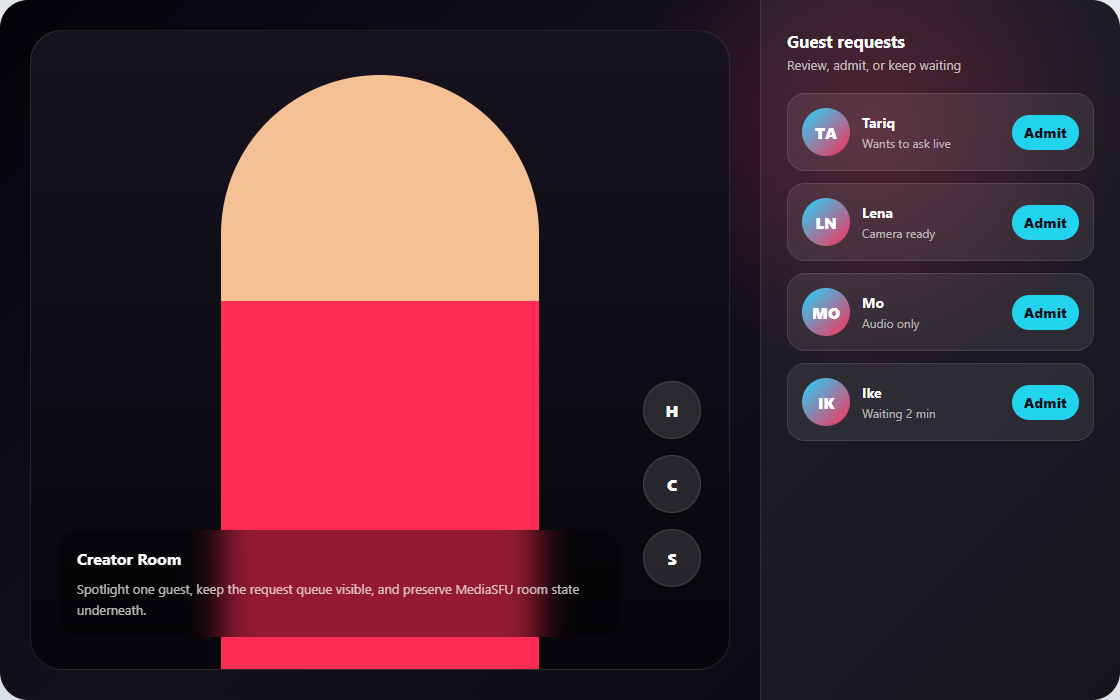
Use this as the first layout target: a host-first live surface, vertical action controls, and a visible request queue for admitting guests. MediaSFU should continue to own request, permission, and room state while your app owns the queue presentation.
Best starting path
Start with:
This product shape usually needs more than card-level overrides because the host queue is part of the main product experience.
Two valid angles for the same product shape
This tutorial's main implementation uses returnUI={true} with customComponent, but the same guest-queue experience can also be built headless.
| Angle | What you keep | Use it when |
|---|---|---|
returnUI={true} + customComponent | MediaSFU runtime shell with your queue UI as the visible workspace | You want to move quickly while keeping MediaSFU's room entry flow and runtime presentation contract intact. |
returnUI={false} + headless shell | Your own queue screen rendered from sourceParameters outside the stock room UI | You want the host app shell, queue layout, and promotion flows to live entirely in your app from the first visible screen. |
Headless angle for this same queue pattern:
<>
  <MediasfuGeneric
    connectMediaSFU={true}
    returnUI={false}
    noUIPreJoinOptions={noUIPreJoinOptions}
    sourceParameters={sourceParameters}
    updateSourceParameters={setSourceParameters}
    createMediaSFURoom={createMediaSFURoom}
    joinMediaSFURoom={joinMediaSFURoom}
  />
  <TikTokLiveQueue parameters={sourceParameters} />
</>
Choose the true angle when you want a fast custom workspace around MediaSFU's existing flow. Choose the false angle when the queue, spotlight, and host shell need to remain fully app-owned at every stage. The Tutorial - Support AI Console page is the closest headless reference.
Copy/paste starter: React guest queue shell
This starter gives you the shape of a live host screen. It intentionally keeps admission UI local first; wire each action to your MediaSFU request and permission flow after the baseline room connects.
Create src/TikTokLiveGuestQueueRoom.tsx, paste the component below, and keep your backend /api/mediasfu/create-room and /api/mediasfu/join-room routes forwarding to the same upstream MediaSFU Cloud rooms URL from Secure backend proxy.
import { useMemo, useState } from 'react';
import {
  MediasfuGeneric,
  type CreateMediaSFURoomOptions,
  type JoinMediaSFURoomOptions,
} from 'mediasfu-reactjs';

type RoomResult = { data: Record<string, unknown> | null; success: boolean };
type Guest = { id: string; name: string; note: string };

async function createMediaSFURoom({ payload }: { payload: CreateMediaSFURoomOptions }): Promise<RoomResult> {
  const response = await fetch('/api/mediasfu/create-room', {
    method: 'POST',
    headers: { 'Content-Type': 'application/json' },
    body: JSON.stringify(payload),
  });

  return { data: await response.json(), success: response.ok };
}

async function joinMediaSFURoom({ payload }: { payload: JoinMediaSFURoomOptions }): Promise<RoomResult> {
  const response = await fetch('/api/mediasfu/join-room', {
    method: 'POST',
    headers: { 'Content-Type': 'application/json' },
    body: JSON.stringify(payload),
  });

  return { data: await response.json(), success: response.ok };
}

function TikTokLiveQueue({ parameters }: { parameters: any }) {
  const [activeGuest, setActiveGuest] = useState<Guest | null>(null);
  const guestQueue: Guest[] = (parameters.requests ?? []).map((request: any, index: number) => ({
    id: request.id ?? String(index),
    name: request.name ?? request.userName ?? `Guest ${index + 1}`,
    note: request.type ?? 'Requested to join',
  }));

  return (
    <main style={{ minHeight: '100vh', display: 'grid', gridTemplateColumns: '1fr 320px', background: '#09090b', color: '#fafafa' }}>
      <section style={{ padding: 20, display: 'grid', gap: 16 }}>
        <div style={{ minHeight: 520, borderRadius: 8, background: '#18181b', display: 'grid', placeItems: 'center' }}>
          <div style={{ textAlign: 'center' }}>
            <p style={{ margin: 0, color: '#f43f5e' }}>Live spotlight</p>
            <h1 style={{ margin: '8px 0' }}>{activeGuest?.name ?? 'Host only'}</h1>
            <p>{parameters.roomName ?? 'Connecting room...'}</p>
          </div>
        </div>

        <div style={{ display: 'flex', gap: 12, flexWrap: 'wrap' }}>
          <button onClick={() => parameters.clickVideo?.({ parameters })}>Camera</button>
          <button onClick={() => parameters.clickAudio?.({ parameters })}>Mic</button>
          <button onClick={() => setActiveGuest(null)}>Clear guest</button>
        </div>
      </section>

      <aside style={{ padding: 20, borderLeft: '1px solid #3f3f46' }}>
        <h2>Guest queue</h2>
        <div style={{ display: 'grid', gap: 10 }}>
          {guestQueue.length === 0 ? <p>No guest requests yet.</p> : null}
          {guestQueue.map((guest) => (
            <button
              key={guest.id}
              onClick={() => setActiveGuest(guest)}
              style={{ textAlign: 'left', padding: 12, borderRadius: 8, border: '1px solid #52525b', background: '#18181b', color: '#fafafa' }}
            >
              <strong>{guest.name}</strong>
              <br />
              <span>{guest.note}</span>
            </button>
          ))}
        </div>
      </aside>
    </main>
  );
}

export function TikTokLiveGuestQueueRoom() {
  const noUIPreJoinOptions = useMemo(
    () => ({
      action: 'create',
      eventType: 'webinar',
      userName: 'Host',
      capacity: 50,
      duration: 60,
    }),
    []
  );

  return (
    <MediasfuGeneric
      connectMediaSFU={true}
      returnUI={true}
      noUIPreJoinOptions={noUIPreJoinOptions}
      createMediaSFURoom={createMediaSFURoom}
      joinMediaSFURoom={joinMediaSFURoom}
      customComponent={TikTokLiveQueue}
    />
  );
}
Render it from your app entry:
import { TikTokLiveGuestQueueRoom } from './TikTokLiveGuestQueueRoom';

export default function App() {
  return <TikTokLiveGuestQueueRoom />;
}
These controls are intentionally the lowest-level wiring. In customComponent, the parameters prop is the live MediaSFU helper bundle, so direct calls like clickVideo and clickAudio are fine for proving the workflow quickly.
When MediaSFU already ships the surface you need, prefer reusing it instead of rebuilding it. Recording, chat, and similar modal-driven flows are usually better handled with stock components or uiOverrides while you keep the runtime behavior intact. Read Custom component replacement, Media lifecycle, and UI overrides before polishing the host controls.
What to wire next
- Replace the local
setActiveGuestaction with your real admit or promote flow. - Use MediaSFU request and permission state as the source of truth for the queue.
- Add layout rules for one guest, two guests, and host-only fallback.
- Test request churn, guest disconnect, and reconnect behavior.