MediaSFU ReactJS
MediaSFU ReactJS SDK · mediasfu-reactjs on npm
mediasfu-reactjs is the React 18/19 WebRTC SDK for video conferencing, webinars, live streaming, broadcast, screen sharing, whiteboard, chat, recording, live subtitles, translation, and AI agent rooms — powered by MediaSFU Cloud or your self-hosted MediaSFU Open server. Install with npm install mediasfu-reactjs.









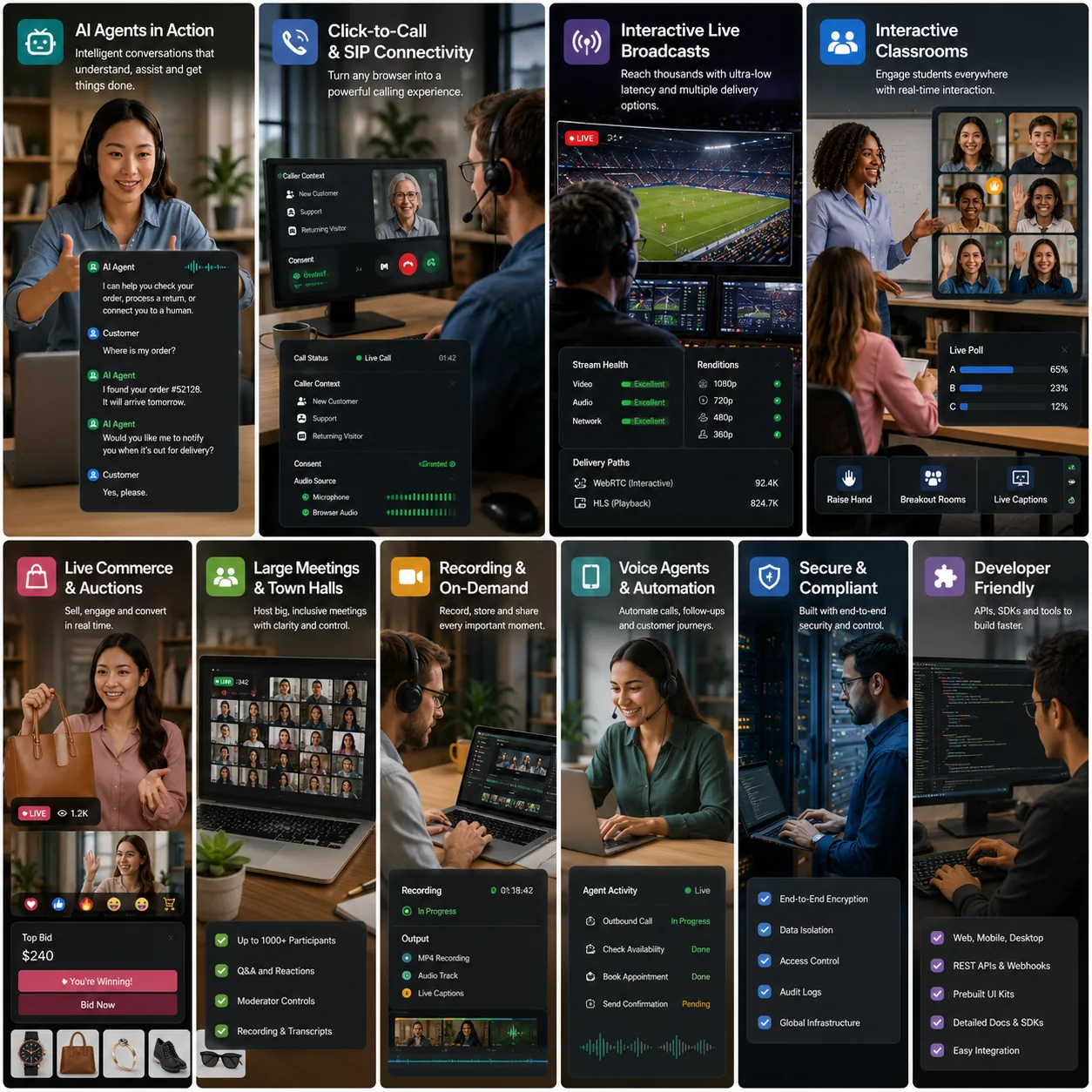
Start with a prebuilt room, customize individual surfaces, or own the complete React interface with headless mode.
📖 Table of Contents
- Start Here
- Backend Requirement
- Common questions
- Troubleshooting
- Choose a starter project
- Quick Start
- Installation
- Component Storybook
- Prebuilt Event Rooms
- Modern UI Components
- Usage Examples
- Key Components
- Customization
- API Reference
- Self-Hosting / Community Edition
- Advanced Features (Panelists, Permissions, Translation)
- sourceParameters - The Power API
- AudioGrid - Display All Audio Participants
- Using Modals Standalone
- Building Your Own UI
- Host leave and rejoin
- SDKs across frameworks
- Detailed Documentation
Build real-time communication into React
mediasfu-reactjs combines a React 18/19 WebRTC client, prebuilt room experiences, and lower-level customization APIs for products that need video meetings, voice and video calls, webinars, interactive broadcasts, chat, screen sharing, recording, whiteboards, live captions, translation, or AI-assisted communication.
Choose the integration depth that matches your product:
- Prebuilt rooms: render
MediasfuGeneric,MediasfuConference,MediasfuWebinar,MediasfuBroadcast, orMediasfuChat. - Modern room UI: use
ModernMediasfuGenericfor the newer theme-aware meeting shell. - Progressive customization: keep the room runtime while replacing cards, modals, controls, and layouts through
uiOverridesand custom components. - Headless React integration: set
returnUI={false}and use MediaSFU's room, media, and participant helpers inside your own interface.
Common React product shapes
| You are building | Start with | Extend with |
|---|---|---|
| Team meetings or embedded video calls | MediasfuGeneric or MediasfuConference |
branding, waiting rooms, screen sharing, annotation, recording |
| A webinar or virtual event | MediasfuWebinar |
panelists, permissions, audience controls, polls |
| An interactive livestream or host-led broadcast | MediasfuBroadcast |
custom host controls, layouts, recording |
| A support, community, or chat-first room | MediasfuChat |
audio/video escalation, moderation, custom messages |
| A fully branded collaboration workspace | ModernMediasfuGeneric or headless mode |
uiOverrides, custom cards, sourceParameters |
Choose a starter project
Want a working application to build on? Start with a GitHub project below. Choose the product closest to yours, run its React client and backend, then customize the interface. Each repository documents its own setup and supported platforms; a multi-SDK repository does not imply identical features on every SDK.
| Build this | GitHub starter | Useful patterns to reuse |
|---|---|---|
| An interactive classroom | Interactive Classroom | React teacher/learner views; headless, hybrid, and standard UI; backgrounds, polls, whiteboard, and breakouts |
| One-to-one voice and video calls | Familiar Calls | Call screens, participant lifecycle, media controls |
| Live shopping or auctions | Live Auction | Host and bidder views, timed lots, live media |
| A watch party or broadcast with conversation | Watch Together | Program video versus participant cameras, WHIP input, HLS audience |
| Voice, vision, or chat agents | Agents | Headless room UI, agent playback, voice and chat starter screens |
| Browser calling and SIP/PSTN workflows | VOIP | Dialing, call state, telephony controls, backend integration |
| Social audio/video spaces | SpacesTek Final / Advanced | Secure room proxies; headless layouts, roles, admission, and moderation |
| Embeddable widgets | MediaSFU widgets | Six web components, React composition, customizable controls |
| Recording your own room layout | Custom UI Recording | App-defined recording scenes and recording controls |
| A small SDK integration baseline | QuickStart Apps | Framework-specific setup and room examples |
For a classroom, try the Interactive Classroom showcase. The canonical docs cover React virtual backgrounds, Save-before-Start breakouts, server-side room audio denoising, and remote audio playback and recovery. Keep your authentication, room authorization, and reusable credentials on your backend when adapting any starter.
Start Here
npm install mediasfu-reactjs
import { ModernMediasfuGeneric } from "mediasfu-reactjs";
export default function App() {
return (
<ModernMediasfuGeneric
credentials={{ apiUserName: "your-api-username", apiKey: "your-api-key" }}
connectMediaSFU={true}
containerStyle={{ minHeight: "100vh" }}
/>
);
}
Local prototypes only. Passing credentials in the browser is fine for a private local prototype. For a shared or deployed app, keep the real username and key on your backend and replace both
createMediaSFURoomandjoinMediaSFURoomwith thin adapters to it — see Backend Requirement. Never ship a privileged API key in a browser bundle.
Prefer the classic interface? MediasfuGeneric accepts the same props:
import { MediasfuGeneric } from "mediasfu-reactjs";
<MediasfuGeneric
credentials={{ apiUserName: "your-api-username", apiKey: "your-api-key" }}
connectMediaSFU={true}
/>;
Render the standard UI from the same headless room
Use ModernMediasfuGenericHead when you want one headless room engine but also
want to place MediaSFU's complete modern interface inside your own layout. The
Head component owns no room state or socket; it reads the current publication
from the engine and renders the same component tree as
ModernMediasfuGeneric.
import {
ModernMediasfuGeneric,
ModernMediasfuGenericHead,
useMediasfuHeadless,
} from "mediasfu-reactjs";
function RoomLayout({ connectionOptions }) {
const room = useMediasfuHeadless();
return (
<>
<ModernMediasfuGeneric
{...connectionOptions}
returnUI={false}
renderUIExternally
sourceParameters={room.sourceParameters}
updateSourceParameters={room.updateSourceParameters}
onMediaChanged={room.onMediaChanged}
/>
<ModernMediasfuGenericHead parameters={room} />
</>
);
}
This is useful for progressive customization: start with the complete UI, replace individual panels or controls with your own components, and keep all remaining modals, sidebars, media surfaces, and lifecycle behavior attached to the same room engine. See HEADLESS_GUIDE.md for the full contract and modal-visibility guidance.
Backend Requirement
This SDK needs a MediaSFU-compatible backend for room lifecycle, signaling, and media routing.
| Option | Use it when | What to pass |
|---|---|---|
| MediaSFU Cloud | You want managed infrastructure | Backend-backed createMediaSFURoom and joinMediaSFURoom callbacks |
| MediaSFU Open / CE | You want to self-host | localLink="http://your-server:3000" and your own server config |
Cloud room helpers target https://mediasfu.com/v1/rooms/. Put the real API
credentials behind a secure proxy for production. MediaSFU Open is the media
server that you run and operate locally or in your infrastructure; point
localLink at that server.
Get Cloud API access at mediasfu.com, explore GET/POST requests in the API Sandbox, and follow the secure backend proxy guide.
Common questions
Is MediaSFU ReactJS only a component library?
No. The package includes prebuilt React room UI and the browser-side WebRTC/session runtime. A MediaSFU-compatible backend still handles signaling, room lifecycle, and SFU media routing.
Can I use MediaSFU with my own React design system?
Yes. Start by replacing individual surfaces through uiOverrides and custom cards. Use returnUI={false} when your application should own the entire visual shell.
Can I self-host the backend?
Yes. Point localLink at a MediaSFU Open deployment. The same React components can also connect to managed MediaSFU Cloud rooms.
Does the SDK support more than basic video calls?
Yes. The room runtime includes meeting, webinar, broadcast, and chat experiences with screen sharing and annotation, recording, whiteboards, polls, breakout rooms, live captions, translation, and extensible AI-agent workflows.
Troubleshooting
| What you see | Likely cause | What to do |
|---|---|---|
| "Unable to connect. Check your credentials and try again." | The room service rejected the credentials, or your create/join backend returned an error. | Check the API username and key on your server, and make sure your create/join adapters pass the room service's response through. For MediaSFU Open, confirm that localLink points to a server the browser can reach. |
| The camera or microphone never starts | The page is not a secure context, or the browser permission was denied. | Serve the app over HTTPS (or localhost during development) and allow camera and microphone access for the site. |
| "You must turn on your video before you can start recording" | The recording is set to capture video while your camera is off. | Turn the camera on first, or switch the recording to audio only. The same applies to audio recordings and the microphone. |
| "You can only re-configure recording after pausing it" | Recording settings are locked while a recording is running. | Pause the recording, change the settings, then resume. |
| "You cannot turn off your camera while recording video…" | Turning the camera off would interrupt the recording. | Pause or stop the recording first. |
| A message ending in "Access denied by host." | The host has restricted that action for participants. | Ask the host to change the participant's permissions. |
| "Screen share is not allowed when whiteboard is active" | Screen sharing and the whiteboard cannot run at the same time. | Close the whiteboard, then start screen sharing. |
Integration Paths
- Keep the bundled room UI for the fastest route to production.
- Use
ModernMediasfuGenericwhen you want the premium themed shell as your default entry point. - Replace targeted surfaces with
uiOverrides, custom cards, and custom shells. - Use
customComponentorreturnUI={false}when your app should own the entire shell.
Embed a room without viewport overflow
Pass the fraction of the browser viewport occupied by the host container. Both
values default to 1, so existing full-page rooms are unchanged.
<div style={{ width: 1294, height: 760 }}>
<ModernMediasfuGeneric
containerWidthFraction={1294 / window.innerWidth}
containerHeightFraction={760 / window.innerHeight}
/>
</div>
When either fraction is below 1, the SDK root fills that parent with 100%
dimensions. The same boundary is forwarded to MainContainer, MainAspect,
MainScreen, and UI overrides, including after resize.
Package Links
- Docs portal: https://mediasfu.com/documentation
- User guide: https://mediasfu.com/user-guide
- Storybook: https://mediasfu.com/storybook
- Detailed guide: README_DETAILED.md
- Changelog: CHANGELOG.md
🚀 Quick Start
Three steps. Under 5 minutes. First video call live.
1. Install
npm install mediasfu-reactjs
2. Import & Render
import { ModernMediasfuGeneric } from 'mediasfu-reactjs';
function App() {
return (
<ModernMediasfuGeneric
credentials={{ apiUserName: "yourUsername", apiKey: "yourAPIKey" }}
/>
);
}
Use browser-side credentials only for a private local prototype. Before you share or deploy the app, move them behind your backend as described in Backend Requirement.
3. Run
npm start
That's it. You have a fully-featured video conferencing room with screen sharing, chat, recording, and more.
ℹ️ Critical component styles are automatically injected at runtime. For additional styling options, see Optional CSS Import.
Want to try without a server? Use demo mode:
<ModernMediasfuGeneric
useLocalUIMode={true}
useSeed={true}
seedData={{ member: "DemoUser", eventType: "conference" }}
/>
📦 Installation
# npm
npm install mediasfu-reactjs
# yarn
yarn add mediasfu-reactjs
# pnpm
pnpm add mediasfu-reactjs
Peer Dependencies
The following are required peer dependencies:
{
"react": "^18.2.0 || ^19.0.0",
"react-dom": "^18.2.0 || ^19.0.0",
"@fortawesome/fontawesome-svg-core": "^6.0.0",
"@fortawesome/free-solid-svg-icons": "^6.0.0",
"@fortawesome/react-fontawesome": "^0.2.0",
"bootstrap": "^5.0.0",
"mediasoup-client": "^3.7.0",
"socket.io-client": "^4.0.0",
"universal-cookie": "^7.0.0"
}
Optional Peer Dependencies
For virtual background support (blur, image backgrounds):
npm install @mediapipe/selfie_segmentation@0.1.1675465747
This is optional — if not installed, virtual backgrounds simply won't be available.
Optional CSS Import
Critical styles for control buttons, containers, and core components are automatically injected at runtime — no manual import needed.
If you need additional styling (e.g., custom modal themes, waiting room lists), you can optionally import the full stylesheet:
// Optional: Import for additional component styles
import 'mediasfu-reactjs/dist/main.css';
Most applications work perfectly without this import.
📚 Component Storybook
This package includes the React Storybook used to preview MediaSFU components, seeded room shells, and customization surfaces. It complements the main docs portal and gives teams a fast way to inspect UI behavior before wiring a live backend.
Run it from the MediaSFUReactJS package directory:
npm run storybook
Build the static Storybook output for deployment:
npm run build-storybook
After building, you can preview the deployment output from storybook-static with any static file server:
python3 -m http.server 6006 -d storybook-static
Story coverage is split between generated baseline stories for runtime-light components and curated stories for richer meeting surfaces. Generated baseline stories refresh automatically before both Storybook commands run. To refresh them directly:
npm run generate-storybook-stories
Story organization:
src/stories/Guidescovers onboarding, build-style choices, and override guidance.src/stories/MediaSFUComponentshouses the curatedModernMediasfuGenericroom-shell preview.src/stories/DisplayComponents,src/stories/InternalComponents, andsrc/stories/WhiteboardComponentscover stateful visual surfaces that benefit from hand-tuned fixtures.src/stories/generatedcontains safely stubbed baseline stories for runtime-light modern components.
Curated stories cover flagship meeting shells, video and audio cards, control surfaces, pagination, whiteboard flows, and other stateful experiences that are better represented with explicit fixtures than auto-generated examples.
If you want the public docs site to expose Storybook in navigation, deploy the generated storybook-static output separately and point the docs portal at it with MEDIASFU_STORYBOOK_URL.
🏛️ Prebuilt Event Rooms
Choose the room type that fits your use case — or use MediasfuGeneric for maximum flexibility:
| Component | Use Case | Description |
|---|---|---|
MediasfuGeneric |
Universal | Supports all event types dynamically |
ModernMediasfuGeneric |
Universal (Premium) | Theme-aware, glassmorphism UI |
MediasfuConference |
Meetings | Multi-party video conferencing |
MediasfuWebinar |
Webinars | Presenters + audience model |
MediasfuBroadcast |
Broadcasting | One-to-many live streaming |
MediasfuChat |
Chat Rooms | Text-based with optional media |
All prebuilt components share the same props interface:
interface MediasfuProps {
// Authentication
credentials?: { apiUserName: string; apiKey: string };
// Connection
localLink?: string; // Self-hosted server URL
connectMediaSFU?: boolean; // Toggle auto-connection
// Customization
PrejoinPage?: (options) => ReactNode;
customVideoCard?: CustomVideoCardType;
customAudioCard?: CustomAudioCardType;
customMiniCard?: CustomMiniCardType;
uiOverrides?: MediasfuUICustomOverrides;
// Advanced
returnUI?: boolean; // Set false for headless mode
useLocalUIMode?: boolean; // Demo/local mode
seedData?: SeedData; // Pre-populate for demos
}
💡 Usage Examples
Basic Conference Room
import { MediasfuConference } from 'mediasfu-reactjs';
function ConferenceApp() {
return (
<MediasfuConference
credentials={{
apiUserName: "yourUsername",
apiKey: "yourAPIKey"
}}
/>
);
}
Webinar with Custom Branding
import { MediasfuWebinar, PreJoinPage } from 'mediasfu-reactjs';
function WebinarApp() {
return (
<MediasfuWebinar
credentials={{ apiUserName: "user", apiKey: "key" }}
PrejoinPage={(options) => (
<PreJoinPage
{...options}
imgSrc="/your-logo.png"
/>
)}
containerStyle={{
background: "linear-gradient(135deg, #1a1a2e, #16213e)"
}}
/>
);
}
Demo/Preview Mode (No Server)
import {
MediasfuGeneric,
generateRandomParticipants,
generateRandomMessages
} from 'mediasfu-reactjs';
function DemoApp() {
return (
<MediasfuGeneric
useLocalUIMode={true}
useSeed={true}
seedData={{
member: "DemoUser",
participants: generateRandomParticipants({ count: 5 }),
messages: generateRandomMessages({ count: 10 }),
eventType: "conference"
}}
/>
);
}
Custom Video Cards
import { MediasfuGeneric, VideoCard, CustomVideoCardType } from 'mediasfu-reactjs';
const customVideoCard: CustomVideoCardType = (props) => (
<VideoCard
{...props}
customStyle={{
border: "3px solid #4c1d95",
borderRadius: 20,
boxShadow: "0 10px 40px rgba(76, 29, 149, 0.4)"
}}
/>
);
function App() {
return (
<MediasfuGeneric
credentials={{ apiUserName: "user", apiKey: "key" }}
customVideoCard={customVideoCard}
/>
);
}
Headless Mode (Custom UI)
import { ModernMediasfuGeneric, useMediasfuHeadless } from 'mediasfu-reactjs';
function CustomApp() {
const room = useMediasfuHeadless();
return (
<>
<ModernMediasfuGeneric
credentials={{ apiUserName: 'client00', apiKey: '0'.repeat(64) }}
createMediaSFURoom={createRoomViaBackend}
joinMediaSFURoom={joinRoomViaBackend}
returnUI={false}
noUIPreJoinOptions={{
action: 'create',
capacity: 10,
duration: 30,
eventType: 'conference',
userName: 'Host',
}}
sourceParameters={room.sourceParameters}
updateSourceParameters={room.updateSourceParameters}
onMediaChanged={room.onMediaChanged}
/>
<MyRoomUI room={room} />
</>
);
}
createRoomViaBackend and joinRoomViaBackend are your server-proxy adapters;
the placeholder object is inert and must never be replaced with a real key in
public source.
UI Overrides
import {
MediasfuGeneric,
MainContainerComponent,
MediasfuUICustomOverrides
} from 'mediasfu-reactjs';
const overrides: MediasfuUICustomOverrides = {
// Override component rendering
mainContainer: {
render: (props) => (
<div style={{ border: "4px dashed purple", padding: 16 }}>
<MainContainerComponent {...props} />
</div>
)
},
// Wrap function behavior
consumerResume: {
wrap: (originalFn) => async (params) => {
console.log("Consumer resuming:", params);
return await originalFn(params);
}
}
};
function App() {
return (
<MediasfuGeneric
credentials={{ apiUserName: "user", apiKey: "key" }}
uiOverrides={overrides}
/>
);
}
🧩 Key Components
Display Components
| Component | Purpose |
|---|---|
MainContainerComponent |
Root container for meeting UI |
MainGridComponent |
Grid layout for video tiles |
FlexibleGrid |
Dynamic responsive grid |
VideoCard |
Individual video participant |
AudioCard |
Audio-only participant with waveform |
MiniCard |
Thumbnail participant card |
Pagination |
Navigate participant pages |
Modal Components
| Component | Purpose |
|---|---|
LoadingModal |
Loading overlay |
AlertComponent |
Toast notifications |
ParticipantsModal |
Participant list/management |
MessagesModal |
Chat interface |
RecordingModal |
Recording controls |
PollModal |
Create/vote on polls |
BackgroundModal |
Virtual backgrounds |
BreakoutRoomsModal |
Breakout room management |
ConfigureWhiteboardModal |
Whiteboard settings |
MediaSettingsModal |
Audio/video device selection |
Control Methods
import {
clickVideo, // Toggle video
clickAudio, // Toggle audio
clickScreenShare, // Toggle screen share
startRecording, // Start recording
stopRecording, // Stop recording
launchPoll, // Open poll modal
launchMessages, // Open chat modal
} from 'mediasfu-reactjs';
Socket Events
import {
connectSocket,
disconnectSocket,
joinRoomClient,
// Event handlers
personJoined,
meetingEnded,
receiveMessage,
} from 'mediasfu-reactjs';
🎨 Customization
CSS Variables
The package uses CSS variables for theming:
:root {
--mediasfu-primary: #4c1d95;
--mediasfu-background: #1a1a2e;
--mediasfu-surface: #16213e;
--mediasfu-text: #ffffff;
}
Custom Cards
// Custom video card with overlay
const customVideoCard: CustomVideoCardType = (props) => (
<div style={{ position: 'relative' }}>
<VideoCard {...props} />
<div className="custom-overlay">
<span>{props.name}</span>
<button onClick={() => props.onMute?.()}>Mute</button>
</div>
</div>
);
Complete UI Override
const overrides: MediasfuUICustomOverrides = {
// Layout components
mainContainer: { render: CustomMainContainer },
mainGrid: { render: CustomGrid },
// Modal components
menuModal: { component: CustomMenuModal },
participantsModal: { component: CustomParticipantsModal },
messagesModal: { component: CustomMessagesModal },
// Functions
consumerResume: { wrap: loggingWrapper },
addVideosGrid: { implementation: customGridLogic },
};
📚 API Reference
Types
import type {
// Core types
Participant,
Stream,
Message,
CoHostResponsibility,
Poll,
// Event types
EventType, // 'conference' | 'webinar' | 'chat' | 'broadcast'
CreateMediaSFURoomOptions,
JoinMediaSFURoomOptions,
ResponseJoinRoom,
// UI types
MediasfuUICustomOverrides,
CustomVideoCardType,
CustomAudioCardType,
CustomMiniCardType,
// Socket types
ConnectSocketType,
ConnectLocalSocketType,
} from 'mediasfu-reactjs';
Utilities
For optional server-side room audio denoising, pass backendAudioDenoise: { enabled: true } in a create-room payload (or { enabled: false } to opt out). The only supported profile is arnndn; omit the field to use the account's room preset. MediaSFU's backend validates availability and entitlement. The SDK forwards this room policy; it does not denoise audio locally.
import {
// Room management
joinRoomOnMediaSFU,
createRoomOnMediaSFU,
checkLimitsAndMakeRequest,
// Demo utilities
generateRandomParticipants,
generateRandomMessages,
generateRandomPolls,
// State
initialValuesState,
// Helpers
formatNumber,
sleep,
checkPermission,
} from 'mediasfu-reactjs';
🏠 Self-Hosting / Community Edition
For self-hosted MediaSFU servers:
<MediasfuGeneric
localLink="https://your-mediasfu-server.com"
connectMediaSFU={false} // Don't connect to cloud
/>
Hybrid Mode (Local + Cloud)
<MediasfuGeneric
localLink="https://your-server.com"
connectMediaSFU={true} // Also connect to MediaSFU cloud
credentials={{ apiUserName: "user", apiKey: "key" }}
/>
📖 Detailed Documentation
For comprehensive documentation including:
- Advanced customization patterns
- Full API reference
- All component props
- Socket event handling
- Recording configuration
- Breakout rooms
- Whiteboard integration
- And much more...
📄 See README_DETAILED.md
🎨 Modern UI Components
ModernMediasfuGeneric is the most advanced, themed variant featuring:
- Premium glass-morphism design with backdrop blur effects
- Smooth animations and micro-interactions
- Dark/Light theme support built-in
- Accessibility-first components
- Responsive layouts for all screen sizes
import { ModernMediasfuGeneric } from 'mediasfu-reactjs';
function App() {
return (
<ModernMediasfuGeneric
credentials={{ apiUserName: "user", apiKey: "key" }}
containerStyle={{
background: "linear-gradient(135deg, #0f172a, #1e3a8a)",
minHeight: "100vh"
}}
/>
);
}
Modern Components Available
| Modern Component | Classic Equivalent | Features |
|---|---|---|
ModernVideoCard |
VideoCard |
Glass effect, animated borders |
ModernAudioCard |
AudioCard |
Gradient waveforms, glow effects |
ModernMiniCard |
MiniCard |
Sleek thumbnails with status |
ModernMenuModal |
MenuModal |
Slide animations, blur backdrop |
ModernMessagesModal |
MessagesModal |
Chat bubbles, typing indicators |
ModernRecordingModal |
RecordingModal |
Status animations, progress rings |
ModernParticipantsModal |
ParticipantsModal |
Search, filters, role badges |
ModernBackgroundModal |
BackgroundModal |
Image gallery, blur previews |
ModernPollModal |
PollModal |
Real-time voting, animations |
ModernBreakoutRoomsModal |
BreakoutRoomsModal |
Drag-and-drop, room previews |
ModernPanelistsModal |
PanelistsModal |
Panelist management for webinars |
ModernPermissionsModal |
PermissionsModal |
Per-participant permission control |
TranslationSettingsModal |
— | Real-time translation configuration |
🌐 Advanced Features
Panelists Mode (Webinars)
In webinar mode, designate specific participants as panelists who can speak, while others remain audience members.
// Panelists are managed via sourceParameters
const { panelists, updatePanelists } = sourceParameters;
// Listen for panelist changes
// Events: panelistsUpdated, addedAsPanelist, removedFromPanelists, panelistFocusChanged
Individual Permissions
Control each participant's capabilities individually:
import { ModernPermissionsModal } from 'mediasfu-reactjs';
// Permission levels:
// "0" - Standard participant
// "1" - Elevated (co-host level)
// "2" - Host (full control)
// Configure per-participant capabilities:
// - Video on/off
// - Audio on/off
// - Screen sharing
// - Chat access
Real-time Translation 🌍
Enable participants to speak in their native language and listen in any language with live AI translation.
import { TranslationSettingsModal } from 'mediasfu-reactjs';
function TranslationExample({ sourceParameters }) {
const [showTranslation, setShowTranslation] = useState(false);
return (
<>
<button onClick={() => setShowTranslation(true)}>
🌐 Translation Settings
</button>
<TranslationSettingsModal
isVisible={showTranslation}
onClose={() => setShowTranslation(false)}
parameters={sourceParameters}
/>
</>
);
}
// Translation events available:
// - translation:roomConfig
// - translation:languageSet
// - translation:subscribed
// - translation:transcript
Features include:
- Set your spoken language — The system knows what language you're speaking
- Choose listening language — Hear others translated to your preferred language
- Real-time transcription — See live transcripts
- Multiple language support — 50+ languages available
🔧 sourceParameters - The Power API
For a custom UI, use useMediasfuHeadless(). It keeps the SDK seed stable,
accepts every publication, exposes pure current state and actions, and wires the
explicit media-change signal. Pass all three bridge props to the room:
| Prop | Purpose |
|---|---|
sourceParameters |
Stable seed object from the hook |
updateSourceParameters |
Receives every complete parameter publication |
onMediaChanged |
Reports coalesced video, audio, screen, and consumer transitions |
The callbacks deliver the room state, methods, and streams needed by a custom interface. A published parameter bag is a snapshot: do not retain it outside the hook and do not deep-deduplicate publications.
import {
AudioGrid,
ModernMediasfuGeneric,
useMediasfuHeadless,
} from 'mediasfu-reactjs';
import { createRoom, joinRoom } from './roomProxy';
function CustomUI() {
const room = useMediasfuHeadless();
const primary = room.screenShare.stream
?? room.remoteVideos[0]?.stream
?? room.localVideo;
return (
<>
<ModernMediasfuGeneric
credentials={{ apiUserName: 'client00', apiKey: '0'.repeat(64) }}
createMediaSFURoom={createRoom}
joinMediaSFURoom={joinRoom}
returnUI={false}
noUIPreJoinOptions={{
action: 'create',
capacity: 10,
duration: 30,
eventType: 'conference',
userName: 'Host',
}}
sourceParameters={room.sourceParameters}
updateSourceParameters={room.updateSourceParameters}
onMediaChanged={room.onMediaChanged}
/>
{primary && <MyVideo stream={primary} />}
<button disabled={!room.ready} onClick={room.controls.toggleMic}>
{room.micOn ? 'Mute' : 'Unmute'}
</button>
{/* Mount every audio component, even when the audio surface is hidden. */}
<div style={{ position: 'fixed', width: 1, height: 1, opacity: 0 }}>
<AudioGrid componentsToRender={room.audioComponents} />
</div>
</>
);
}
The inert credential object only satisfies the SDK prop shape because both
room callbacks have been replaced. createRoom and joinRoom must call your
backend, where real MediaSFU credentials remain server-side. See the
secure backend proxy guide.
Use room.parameters.getCurrentParams() when you need an unprojected pure read.
Never call getUpdatedAllParams() from render, polling, pagination, or a
selector: it republishes the shared parameter bag and can create an update loop.
Key sourceParameters Properties
Media Streams
const {
allVideoStreams, // All video MediaStream objects
allAudioStreams, // All audio MediaStream objects
localStream, // Your local camera stream
localStreamAudio, // Your local microphone stream
localStreamScreen, // Your screen share stream (if active)
remoteScreenStream, // Remote screen share stream
} = sourceParameters;
Participant Data
const {
participants, // Full participant list
participantsCounter, // Current count
filteredParticipants, // Filtered by search
waitingRoomList, // Users in waiting room
coHost, // Current co-host name
member, // Your username
islevel, // Your permission level ('0', '1', '2')
youAreHost, // Boolean
youAreCoHost, // Boolean
} = sourceParameters;
Room State
const {
roomName, // Current room name
eventType, // 'conference' | 'webinar' | 'broadcast' | 'chat'
recordStarted, // Is recording active
recordPaused, // Is recording paused
shareScreenStarted, // Is screen sharing active
validated, // Is room validated/connected
messages, // Chat messages array
polls, // Active polls
} = sourceParameters;
Helper Methods
getParticipantMedia - Get Individual Streams
const { getParticipantMedia } = sourceParameters;
// Get video stream by participant name
const videoStream = await getParticipantMedia({
name: "Alice",
kind: "video"
});
// Get audio stream by producer ID
const audioStream = await getParticipantMedia({
id: "producer-id-123",
kind: "audio"
});
// Use in a video element
if (videoStream) {
videoRef.current.srcObject = videoStream;
}
Media Control Methods
const {
clickVideo, // Toggle local video
clickAudio, // Toggle local audio
clickScreenShare, // Toggle screen share
switchVideoAlt, // Switch camera device
switchUserAudio, // Switch audio input device
} = sourceParameters;
// Toggle video with parameters
await clickVideo({ parameters: sourceParameters });
Modal Toggles
const {
updateIsMenuModalVisible,
updateIsRecordingModalVisible,
updateIsParticipantsModalVisible,
updateIsMessagesModalVisible,
updateIsPollModalVisible,
updateIsBackgroundModalVisible,
updateIsBreakoutRoomsModalVisible,
updateIsMediaSettingsModalVisible,
} = sourceParameters;
// Open the chat modal
updateIsMessagesModalVisible(true);
🎵 AudioGrid - Display All Audio Participants
Use AudioGrid with audio streams from sourceParameters:
import { AudioGrid, AudioCard } from 'mediasfu-reactjs';
function AudioParticipantsView({ sourceParameters }) {
const { allAudioStreams, participants } = sourceParameters;
// Build audio components from streams
const audioComponents = allAudioStreams.map((streamObj, index) => {
const participant = participants.find(p => p.audioID === streamObj.producerId);
return (
<AudioCard
key={streamObj.producerId || index}
name={participant?.name || 'Unknown'}
audioStream={streamObj.stream}
showWaveform={true}
barColor="#22c55e"
customStyle={{
background: "rgba(34, 197, 94, 0.1)",
borderRadius: 16,
padding: 12
}}
/>
);
});
return (
<AudioGrid
componentsToRender={audioComponents}
containerProps={{
style: {
display: 'grid',
gridTemplateColumns: 'repeat(auto-fill, minmax(200px, 1fr))',
gap: 16,
padding: 20
}
}}
/>
);
}
🎬 Using Modals Standalone
Keep the room engine mounted with returnUI={false}, then place its exported
components inside your layout. Accept every updateSourceParameters
publication and pass the latest room parameters back to the component.
The room owns visibility as well as media state. Use its matching updater to
open and close a modal; do not create a second useState visibility flag.
This is especially important for virtual-background restoration and recording
confirmation. A visible settings panel does not mean media has been published
or recording has started.
Virtual Background Modal
sourceParameters below is the latest published room bag, not the initial seed.
import type { ComponentProps } from 'react';
import { getCurrentParams, ModernBackgroundModal } from 'mediasfu-reactjs';
type BackgroundRoom = ComponentProps<typeof ModernBackgroundModal>['parameters'];
function BackgroundSelector({ sourceParameters }: { sourceParameters: BackgroundRoom }) {
const room = getCurrentParams({ parameters: sourceParameters });
return (
<>
<button onClick={() => room.updateIsBackgroundModalVisible(true)}>
Change background
</button>
<ModernBackgroundModal
isVisible={room.isBackgroundModalVisible === true}
onClose={() => room.updateIsBackgroundModalVisible(false)}
parameters={room as BackgroundRoom}
renderMode="inline"
contentProps={{ className: 'my-background-panel' }}
/>
</>
);
}
Keep ModernBackgroundModal mounted for the lifetime of the room; let
isVisible control its lifecycle. Choose renderMode="modal" for an overlay
or "inline" for a panel. Its title, content, preview and button props let you
restyle the UI without replacing camera processing. Display local media through
the headless media resolver so the preview follows the published processed track.
The built-in Blur tile applies person-aware background blur through the same
preview, save, publishing, restoration, and camera-off lifecycle as image
backgrounds. Set the modal's optional blurPixels prop to tune its strength.
Fully custom UIs can call applyBackgroundBlur({ parameters, blurPixels: 16, publish: true }) and clear it with clearVirtualBackground.
Image and blur backgrounds target up to 5 processed frames per second when the
browser tab is hidden (a 200 ms delay after each completed frame). This is
best-effort: browser power-saving policies can
still throttle camera capture and timers. Set
keepProcessingWhenHidden={false} on either background modal, or pass
keepProcessingWhenHidden: false to the headless background helper, to use
the browser's normal hidden-tab behavior.
Recording Modal
import type { ComponentProps } from 'react';
import { getCurrentParams, ModernRecordingModal } from 'mediasfu-reactjs';
type RecordingRoom = ComponentProps<typeof ModernRecordingModal>['parameters'];
function RecordingSettings({ sourceParameters }: { sourceParameters: RecordingRoom }) {
const room = getCurrentParams({ parameters: sourceParameters });
return (
<>
<button onClick={() => room.updateIsRecordingModalVisible(true)}>
Recording settings
</button>
<ModernRecordingModal
isRecordingModalVisible={room.isRecordingModalVisible === true}
onClose={() => room.updateIsRecordingModalVisible(false)}
confirmRecording={room.confirmRecording}
startRecording={room.startRecording}
parameters={room as RecordingRoom}
/>
</>
);
}
The component retains the SDK's confirmation and start workflow. Opening it does not bypass recording permissions or start recording automatically.
Device settings and other components
Match the exact props used by the room engine; modal prop names are not uniform:
| Component | Visibility prop | Close callback |
|---|---|---|
ModernBackgroundModal |
isVisible |
onClose → updateIsBackgroundModalVisible(false) |
ModernRecordingModal |
isRecordingModalVisible |
onClose → updateIsRecordingModalVisible(false) |
ModernMediaSettingsModal |
isMediaSettingsModalVisible |
onMediaSettingsClose → updateIsMediaSettingsModalVisible(false) |
Each component receives the same current room parameters. Do not route a
headless action into an invisible built-in sidebar. If you build your own
sidebar, the exported SidebarPanel supplies the shell; you supply its content
and navigation. Keep the underlying modal visibility connected to the room.
See the headless guide for parameter publication and media rendering.
🏗️ Building Your Own UI
For a complete application, choose a GitHub starter first. The following custom-room component shows the essential wiring: one mounted engine, live parameter publications, resolved video, one remote-audio playback path, and a background modal controlled by the room.
Pass stable noUIPreJoinOptions and authenticated backend adapters as props.
The adapter types are the SDK's own contracts; see the
backend proxy guide.
Do not replace the inert credential placeholders with reusable secrets.
import { useEffect, useRef, useState, type ComponentProps } from 'react';
import {
AudioGrid,
ModernBackgroundModal,
ModernMediasfuGeneric,
getCurrentParams,
useMediasfuHeadless,
} from 'mediasfu-reactjs';
type EngineProps = ComponentProps<typeof ModernMediasfuGeneric>;
type CallProps = Required<Pick<EngineProps,
'noUIPreJoinOptions' | 'createMediaSFURoom' | 'joinMediaSFURoom'
>> & { onLeft: () => void };
type BackgroundRoom = ComponentProps<typeof ModernBackgroundModal>['parameters'];
function VideoSurface({ stream }: { stream: MediaStream }) {
const ref = useRef<HTMLVideoElement>(null);
const [needsPlay, setNeedsPlay] = useState(false);
useEffect(() => {
const video = ref.current;
if (!video) return;
let disposed = false;
video.srcObject = stream;
void video.play().then(
() => { if (!disposed) setNeedsPlay(false); },
() => { if (!disposed) setNeedsPlay(true); },
);
return () => { disposed = true; video.srcObject = null; };
}, [stream]);
return (
<>
{/* AudioGrid owns remote sound; never play it again from these videos. */}
<video ref={ref} autoPlay playsInline muted style={{ width: '100%' }} />
{needsPlay && <button onClick={() => {
void ref.current?.play().then(() => setNeedsPlay(false)).catch(() => {});
}}>Play video</button>}
</>
);
}
export function CustomMeetingApp({ onLeft, ...connection }: CallProps) {
const room = useMediasfuHeadless();
const [leaving, setLeaving] = useState(false);
const [notice, setNotice] = useState('');
const live = getCurrentParams({ parameters: room.parameters });
const leave = async () => {
if (leaving) return;
setLeaving(true);
const result = await room.controls.leave(false, false);
if (result.ok) onLeft(); // Parent unmounts this entire room component.
else { setNotice(result.error); setLeaving(false); }
};
return (
<main>
{/* Never replace or unmount this engine when the room becomes ready. */}
<ModernMediasfuGeneric
{...connection}
credentials={{ apiUserName: 'client00', apiKey: '0'.repeat(64) }}
returnUI={false}
sourceParameters={room.sourceParameters}
updateSourceParameters={room.updateSourceParameters}
onMediaChanged={room.onMediaChanged}
/>
<h1>{live.roomName || 'Connecting to your room'}</h1>
{!room.ready && <p role="status">{room.readiness.reason}</p>}
{notice && <p role="status">{notice}</p>}
{live.alertVisible && <p role="status">{live.alertMessage}</p>}
{room.screenShare.stream && <VideoSurface stream={room.screenShare.stream} />}
{room.cameraOn && room.localVideo && <VideoSurface stream={room.localVideo} />}
{room.remoteVideos.map(({ producerId, stream }) => (
<VideoSurface key={producerId || stream.id} stream={stream} />
))}
<AudioGrid componentsToRender={room.audioComponents} />
<button disabled={!room.ready} onClick={room.controls.toggleMic}>
{room.micOn ? 'Mute' : 'Unmute'}
</button>
<button disabled={!room.ready} onClick={room.controls.toggleCamera}>
{room.cameraOn ? 'Camera off' : 'Camera on'}
</button>
<button disabled={!room.ready} onClick={() => live.updateIsBackgroundModalVisible(true)}>
Background
</button>
<button disabled={leaving} onClick={leave}>Leave room</button>
{/* Mount when parameters are ready; keep mounted while hidden. */}
{live.getUpdatedAllParams && <ModernBackgroundModal
isVisible={live.isBackgroundModalVisible === true}
onClose={() => live.updateIsBackgroundModalVisible(false)}
parameters={live as BackgroundRoom}
/>}
</main>
);
}
This is a room UI, not an authentication backend. Mount it after your user has
chosen to create or join; unmount it after leaving. Host End for everyone
is a separate action (room.controls.leave(false, true)).
- Hybrid UI: reuse the SDK modal components with the exact room parameters and visibility updaters; style their containers.
- Fully custom backgrounds: use
applyVirtualBackgroundandclearVirtualBackground; renderroom.localVideo, not rawlocalStreamVideo. Follow the background recipe. - Breakout classrooms: follow the assignment, Save/Start, and media-page recipe. Filtering participant cards alone does not change breakout membership or resume media.
- Visible feedback: headless mode does not mount the SDK alert UI. Render
its alert state or supply a custom
showAlertsurface; keep Save and Start reachable.
SDKs across frameworks
MediaSFU is available across web, mobile, and native platforms. The integration model and feature evidence vary by SDK, so use each package's documentation when choosing a target:
| Framework | Package |
|---|---|
| React | mediasfu-reactjs (you are here) |
| React Native | mediasfu-reactnative |
| Expo | mediasfu-reactnative-expo |
| Flutter | mediasfu_sdk |
| Angular | mediasfu-angular |
| Vue | mediasfu-vue |
| Framework-agnostic runtime | mediasfu-shared |
| Android (Kotlin) | MediaSFU Android |
Useful links
- Website: mediasfu.com
- Documentation: mediasfu.com/reactjs
- API Documentation: mediasfu.com/developers
- MediaSFU Open: github.com/MediaSFU/MediaSFUOpen
- Sandbox: mediasfu.com/sandbox
- Community Forum: mediasfu.com/forums
- GitHub: github.com/MediaSFU
Host leave and rejoin
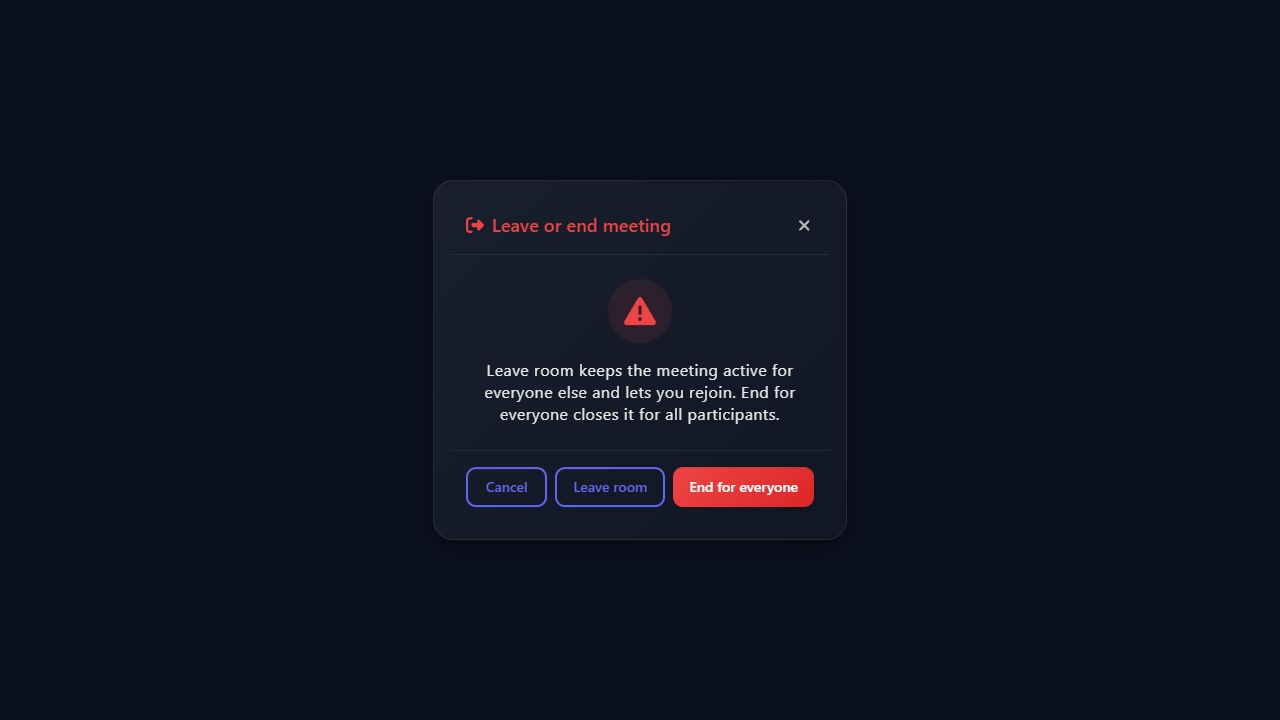
Hosts get two explicit choices: Leave room disconnects only the host and keeps the room available for rejoin, while End for everyone preserves the historical room-ending behavior. Existing integrations remain backward compatible because endRoomOnHostExit defaults to true.
await actions.leave(false, false); // ban=false, endRoomOnHostExit=false
📄 License
MIT © MediaSFU
Built with ❤️ by MediaSFU
Voice · Video · AI · Translation · Cloud or self-hosted